Web App Guide
Dashboard
Your saved locations at a glance.
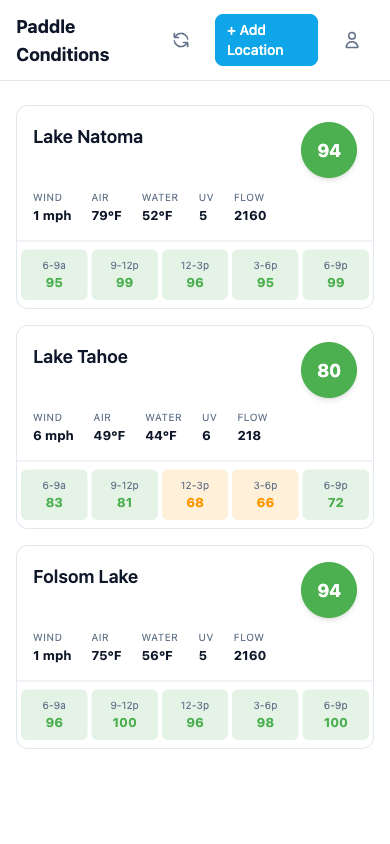
Location cards
The dashboard shows all your saved locations at a glance. Each location card displays:
- Paddle score (0-100) as a large number. Blue for go, amber for caution, red for no-go.
- Rating description explaining conditions at a glance, like "Great conditions for paddling" or a warning when conditions are rough.
- Current conditions including wind, temp, water temp, UV, and flow in a compact row.
- Blue accent border on the left edge that shifts to amber or red when conditions warrant caution.
- Data age shown in the bottom row when conditions are more than an hour old, like "2h ago" or "yesterday at 3:15 PM."
Tap any card to open the full location detail view with charts and detailed breakdowns.
Score states
Each score has three possible states:
- Go (70-100): Great conditions. Get out there.
- Caution (40-69): Doable, but check the details.
- No-go (0-39): Conditions aren't favorable right now.
Pull to refresh
Pull down on the dashboard (or tap the refresh button) to reload conditions for all your locations. If any location's data is stale, a background refresh will kick in automatically. The refresh button is disabled when you're offline. See Conditions & Caching for how refresh frequency works and how offline access keeps your data available.