Web App Guide
Adding Locations
Find your paddle spot from 4,000+ water bodies or add a custom location.
Tap the + button on the dashboard to add a new location. There are two ways to find a spot:
Curated locations
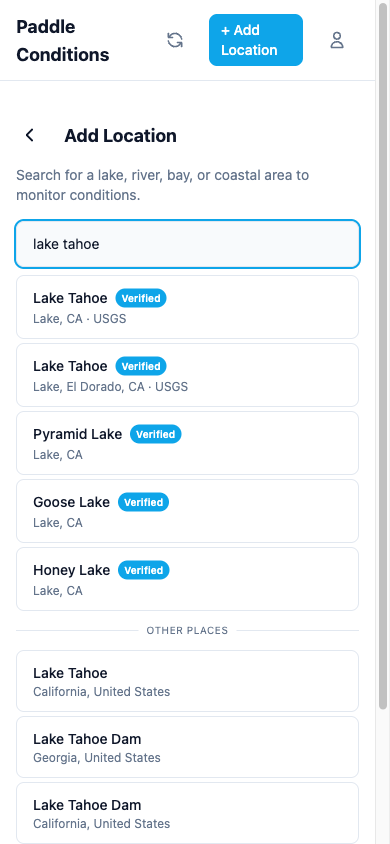
Search from a database of over 4,000 verified water bodies across California. Curated locations automatically connect to the nearest monitoring stations (USGS, NOAA, and CDEC) for water temperature, streamflow, river stage, reservoir data, and tidal data. California locations get extra coverage from CDEC stations, including reservoir levels, dam release tracking, and water quality sensors where available. Look for the verified badge next to curated results.
Custom locations
If your spot isn't in the curated database, type any address or place name. The app will geocode it and set up weather data automatically. You can manually configure monitoring station connections later.
Activity profiles
When adding a location, choose your activity (SUP, kayak, or general paddling). The activity profile adjusts wind thresholds and scoring weights so your conditions score reflects what actually matters for your sport.
Multi-spot locations
Some locations support multiple spots for different areas of the same water body. For example, a large lake might have separate conditions for the north shore versus the south shore. When available, you can toggle between spots on the location detail page.